Wednesday, December 4, 2013

Are you Prepared for Gen Y?

The first question many of you will have in their mind is: "What does Gen Y mean?"

Wikipedia says “The Generation Y, also known as Millennial Generation, is the demographic cohort following Generation X. There are no precise dates when the generation starts and ends. Commentators use beginning birth years from the early 1980s to the early 2000s.”

Most importantly below are a few notable characteristics of Generation (Gen) Y in comparison to other generations in the workplace :
  1. Gen Y demands flexible work hours – a story in Time magazine says “Gen Y Seeks Work-Life Balance Above All Else”
  2. Gen Y is focused on extrinsic values such as image, money etc.
  3. Gen Y is highly tech-dependent – “Millennials Tech-Dependent, But Not Necessarily Tech-Savvy”
The Gen Y itself is one of the biggest driver for many new initiatives in an organizations such as Bring Your Own Device (BYOD), social media (Facebook, Twitter, etc) and many more. Since Gen Y is the next greatest generation, most organizations are undergoing paradigm shift and that’s why perimeter based security is evolving and moving to virtual perimeters.

Identity is the new virtual perimeter, and traditional Identity and Access Management solutions are not sufficient to enhance visibility of environment, provide actionable insight and risk-based scoring in context to identity. The Prolifics’ Identity Intelligence solution with IBM QRadar delivers a comprehensive IAM.next solution with actionable insights and 360 degree view of IT environment. Our solution is uniquely positioned to extend the integration of traditional Security Information and Event Management (SIEM) to identity systems to more intelligently manage security risks from user activity in real time and provide continuous control of insider threats through identity analytics.

Want to learn more about our Identity Intelligence solution? Read more here.


Nilesh Patel is a Security Solution Architect with Prolifics and he is a preeminent identity and access management and security intelligence expert. Nilesh is a certified solution advisor for IBM security and compliance management solutions and he is an accredited IBM Redbooks® Master Author. Prior to Prolifics, Nilesh worked with IBM as Senior Identity and Access Management and Security Intelligence Professional.

Friday, November 15, 2013

Prolifics Identity Intelligence for Today's Security Challenges

The term security is really a wide term and it can mean different things to different people across an organization. One of the best frameworks used for enterprise security is the IBM Security framework, an architectural framework that deals with security and security issues of any organization. The IBM security framework simply break downs organizations security into different pillars such as People, Data, Application and Infrastructure.

In today’s business environment, security controls are implemented using different products in each of these pillars. Let’s take an example of the "People" pillar. The People pillar of the IBM security framework offers security in context of identities and accounts for an organization; and this is fulfilled using Identity and Access Management (IAM) solutions, which can be implemented using Identity Manager, Access Manager and Enterprise Single Sign-On products. The fact is - all these products are good at what they supposed to do individually, but these need to be constantly review to measure their effectiveness. To fulfill this gap, on security intelligence side, solutions like Security Information and Event Management (SIEM) can connect to each and every component of the environment and because of this, SIEM can better understand the security posture of the complete environment and the solutions are as good as a Big Boss of any IT environment.

Prolifics' Identity Intelligence solution is a tight integration of IAM and SIEM domain. When I say a tight integration, that does not simply mean collecting events from IAM environments. Identity Intelligence is about adding value to existing controls for intelligent security controls such as tracking and reporting misuse of access rights.

Prolifics has been a leader in leveraging IBM Security Software to deliver comprehensive Identity and Access Management solutions, and now Prolifics' new innovative Identity Intelligence solution using the IBM QRadar product family helps organizations more intelligently manage risks.

The Prolifics security team will be showcasing our Identity Intelligence solution at Gartner Identity & Access Management (IAM) Summit 2013. If you are attending the conference, be sure to visit us at booth # 411.

Interested in learning more about Prolifics' Identity Intelligence and other security solutions?
Visit Prolifics' website at: www.prolifics.com
Connect with Nilesh Patel: npatel@prolifics.com
Learn more about Prolifics at Gartner IAM Summit


Nilesh Patel is a Security Solution Architect with Prolifics and he is a preeminent identity and access management and security intelligence expert. Nilesh is a certified solution advisor for IBM security and compliance management solutions and he is an accredited IBM Redbooks® Master Author. Prior to Prolifics, Nilesh worked with IBM as Senior Identity and Access Management and Security Intelligence Professional.

Wednesday, October 23, 2013

Customer Showcase: Prolifics Delivers Innovative IBM PureApplication Systems Solution

Recently, Prolifics delivered an innovative solution that leverages IBM PureApplication Systems, a platform system launched in 2012 that is designed and tuned specifically for transactional Web and database applications. Working closely with IBM, Prolifics delivered one of the first successful IBM PureApplication Systems solutions to date to our customer, a financial services company. This solution serves as a model for future implementations of the technology and is a testament to how companies can achieve real business value. The story is highlighted below:

This financial services company offers lending, leasing, and other financing to businesses in some 35 countries. The Company provides capital for a variety of assets, including industrial facilities and equipment, real estate, and corporate aircraft and vehicles. It also develops private-label financing programs, provides revolving credit, and makes equity investments in various industries. As part of a multinational corporation, the Company was beginning to outgrow its IT environment built on five different application server platforms including IBM WebSphere, Oracle WebLogic, JBoss, Apache Tomcat and Oracle GlassFish. Business and IT leaders undertook four key initiatives in support of business growth: streamline processes and strengthen security under a centralized application server platform; add a mobile platform for accelerated processing and approvals of credit applications; expand the Company’s BPM framework to further enable rapid million dollar transactions; and enhance security with a forensic tool to monitor incidents across the enterprise. As a longtime IT partner to this customer, Prolifics worked with the Company and IBM to build a solution that would best address the Company’s growing business needs – an initiative to build a cloud platform that would ensure speed, consistency and repeatability across the enterprise. The solution centers around four KPIs: reducing deployment times from months down to minutes, transitioning from quarterly to on-demand development rates, tracking and minimizing Failed Customer Interactions and enhancing on-demand compliance through automated reporting. Prolifics and IBM developed a solution built on IBM Pure Application Systems and supported by IBM WebSphere Application Server, Worklight, QRadar, WebSphere MQ, WebSphere Process Server and WebSphere Process Center that would enable the new mobile functionality, integration, process management and security capabilities. With the solution in place, Prolifics' customer gains millions of dollars in cost savings as well as improved productivity.

Interested in learning more?
To read more about IBM PureApplication Systems, click here.
To learn more about this customer story or connect with a Prolifics subject matter expert, contact solutions@prolifics.com.

Visit www.prolifics.com for more information.

Wednesday, September 25, 2013

Session Replay: Estimating your Process Projects presented at FSOkx BPM Forum

Earlier this month, Prolifics' Matt Yeager and Anant Gupta hosted a session at the FSOkx 4th Annual Business Process Management and Technology Innovation Forum. The presentation focused on how business leaders can reduce the guesswork associated with the estimation process by considering the following questions:
  • What is it that you are estimating?
  • How big is the thing you are estimating?
  • What baselines are you using for your estimates?
  • Should you be estimating top down, bottom up or somewhere in between?
  • How do your estimates tie to your project plan?
  • Do your estimates reflect ROI and business value?
If you missed the forum, you can catch a replay of the presentation here!

Prolifics Session: Estimating your Process Projects


Interested in taking a deeper dive? Connect with us today!
Matt Yeager, Manager of Advisory and Consulting at Prolifics
Email - myeager@prolifics.com
LinkedIn - Matt Yeager

To learn more about Prolifics, visit www.prolifics.com.

Wednesday, August 21, 2013

Integrating WebSphere Portal 8 With IBM Connections Using Connections Portlets - Part 3

This article is the third and last part of the article which explains details of integrating websphere portal with connections using web app integrator portlet and connections portlets. In the first two parts we saw details of integrating portal with connections using web app integrator portlet.This part explains details of integrating WebSphere Portal with connections using IBM connections portlet.

IBM CONNECTIONS PORTLETS
The IBM Connections Portlets for WebSphere Portal delivers the IBM Connections rich set of social software services for use within a WebSphere Portal environment. WebSphere Portal users can integrate the Activities, Blogs, Bookmarks, Communities, Forums, Profiles, and Wiki applications of Connections along with a Tag Cloud portlet for quick filtering in composite applications. The approach here is to display the Connections in a portlet in portal page.

These portlets are part of the collection of portlets that are available on the Solutions Catalog on IBM Greenhouse and can be downloaded from the following location. Here I used portal version 8 and IBM Connections 3.0.1.

https://greenhouse.lotus.com

After unzipping the downloaded IC3011_Portlets_20121211.zip, you can see that there are two folders available, IC3011_Portlets and IC3011_Portlets_refresh.IC3011_Portlets_refresh is used to integrate with portal 8.This has a PAA file SNPortlets.PAA which has all the connection portlets bundled into it. Once we install this PAA file we can access connections in portal environment.

CONFIGURING AND INSTALLING CONNECTIONS PORTLETS
To install, deploy and configure the connections portlets we need the following steps.


1.  Import a certificate to support SSL
Log into the WebSphere® Application Server Integrated Solutions Console.

Navigate to Security -> SSL certificate and key management -> Key stores and certificates.
Add the certificates to the appropriate trust store as configured in SSL Configurations. To view the SSL configuration and determine the appropriate trust store, navigate to: Security -> SSL certificate and key management -> SSL configurations -> NodeDefaultSSLSettings -> ['Trust Store Name']
For example, in a standalone deployment you navigate to NodeDefaultTrustStore -> Signer certificates for adding certificates. If NodeDefaultSSL Settings points to 'CellDefaultTrustStore', you add a certificate to 'CellDefaultTrustStore'.
Click Retrieve from port. Enter the host and SSL port used by your Connections server.
Click Retrieve signer information and Save.

2.  Run the Following Config Tasks
ConfigEngine install-paa -DPAALocation=C:\WebSphere\wp_profile\paa\SNPortlets.paa -DWasPassword= [was-admin-pwd] -DPortalAdminPwd=[portal-admin-pwd]

ConfigEngine deploy-paa -DappName=SNPortlets -DWasPassword=[was-admin-pwd]  -DPortalAdminPwd=[portal-admin-pwd]

ConfigEngine configure-SNPortlets -DWasPassword=password -DPortalAdminPwd=password

You can configure more parameters by logging into  admin console and add values in WPConnectionsIntegration Service as in step 4.

3.  Changes in Themes
Add the following two modules to your theme profile by editing the corresponding json file. These json files are in your profiles folder of theme. If you are using default theme profile, edit profiles\profile_deferred.json. If you are using a custom profile, add the modules to that profile.

wp_liveobject_framework, dijit_form_17

4.  Configuring WAS admin Console 
Log into the WebSphere Application Server Integrated Solutions Console. Navigate to Resources -> Resource Environment -> Resource Environment Providers.
Set the following five parameters in the custom property, WPConnectionsIntegrationService (create the property if it’s not already there)

blogsHomepageHandle, conversion, tagSearchType, emailSetting and globalBaseURL, the base URL to the Connections server
Configure Authentication

For this article, I used basic authentication instead of SSO as its simple and the setup is common for all environments. SSO setup varies in each environment depending on your access gateway.

Set the authenticationMethod property to basicAuth in the file, lcaccelerator.properties, located at (<wp_profile_root>\installedApps\<cell name>\PA_WPF.ear\snor.pf.portlets.war\WEB-INF\lcaccelerator\properties\ lcaccelerator.properties)

When using basic authentication for the portlets, every user must type in their personal credentials manually in the personalize mode of the portlets or shared credentials can be supplied from the Credential Vault.

If you are planning to use SSO environment, please refer IBM connections wiki from the following location. It has details for various types of SSO environment.

www-10.lotus.com/ldd/lcwiki.nsf

5.  Stop and Restart Portal Server

TESTING IN PORTAL
Once all the configurations are done you can login to the portal. You will see the IBM connections tab with the pages profiles, blogs, forums etc as in the below image. In the edit mode, select Personalize option and enter the username and password in the portlet as below and save it.

You need to enter the username and password in only one portlet and its transmitted to all other portlets. Logout of the portal and login once again and you can see all the connection portlets are displayed with the corresponding connection content. Profiles portlet is displayed in the image below.


This completes the integration of WebSphere Portal and Connections. To learn more about Prolifics, visit www.prolifics.com.

Sanju Varghese, a Senior Consultant for Prolifics, is an experienced Portal and JEE Architect. He was with IBM Global services for six years delivering WebSphere Portal based solutions to its major customers and is certified in Java,IBM WebSphere Portal and BPM . He has performed different IT roles ranging from being an Architect, Consultant, Technical lead and Software developer for several large projects .Currently his main focus area is integrating Portal with Collaboration software. Besides specializing in IBM technologies he likes reading, traveling, watching and playing cricket. He holds a Bachelors Degree in Computer Engineering from Pune University, India.

Monday, August 12, 2013

Integrating WebSphere Portal 8 With IBM Connections Using Web App Integrator - Part 2

This article is the second part of the article which explains details of integrating IBM WebSphere Portal with connections using web app integrator portlet and connections portlets. In the first part we saw an introduction of web app integrator portlet and installed a web app integrator portlet in the portal server and tested successfully. This part explains the steps needed to connect the installed web app integrator portlet with IBM Connections.

CONFIGURING PORTAL FOR INTEGRATION
From portal side we need to do two steps as we did in the first part for testing the WAI portlet.

  • Create a URL page in the portal using the New URL button, with unique name and set the URL value in the page property, in advanced section->HTML, set URL of the connections server.
  • Enter the unique name in the web app integrator portlet to generate the script.


CONFIGURING CONNECTIONS
We need to add the generated script in the header.jsp in connections server.If you search for header.jsp in connections you will see multiple header.jsp files in source directories and all are identical. 

We need to create a header.jsp in the customization directory. Customization directory is mentioned during installation. On Microsoft Windows, if you accepted the defaults during installation, the customization path is C:\Program Files\IBM\LotusConnections\data\shared\customization. This can be found in Websphere admin console of connections server. Customization directory is stored as the value of the websphere environment variable, CONNECTIONS_CUSTOMIZATION_PATH.
  1. Create a directory called "templates" at <customizationDir>\common\nav\.
  2. Copy the header.jsp file from any of the application source directory to the new templates directory. For example, copy the header file from <WAS_home>\Activities.ear\oawebui.war.\nav\templates.
  3. Copy the script generated from the WAI portlet in the header.jsp
  4. Restart the connections server.
Another websphere environment variable, CONNECTIONS_CUSTOMIZATION_DEBUG can be found in the admin console as well. Set the value of this variable to true and then we should not need to restart connections server for jsp changes.

TESTING INTEGRATION 
If you have properly configured till this point, then you can go back to portal. Navigate to the URL page you created, here Connections Integration page, you should see the connections inside the portal. 


We have completed the integration of WebSphere Portal and Connections. I used Portal 8 and IBM Connections 3.01 for this article.You should be able to use it for other versions as well with minimal or no changes.

This article explains the basic integration techniques between portal and connections.For an excellent user experience and to make a seamless transition from application page to application page you should work with a theme developer to place additional theme modules.This will enhance the smooth transition between product pages and produce the desired user experience.

In the next part, Part 3, we will see how to integrate IBM WebSphere Portal and Connections using the Connections portlets.


Sanju Varghese, a Senior Consultant for Prolifics, is an experienced Portal and JEE Architect. He was with IBM Global services for six years delivering WebSphere Portal based solutions to its major customers and is certified in Java,IBM WebSphere Portal and BPM . He has performed different IT roles ranging from being an Architect, Consultant, Technical lead and Software developer for several large projects .Currently his main focus area is integrating Portal with Collaboration software. Besides specializing in IBM technologies he likes reading, traveling, watching and playing cricket. He holds a Bachelors Degree in Computer Engineering from Pune University, India.

Friday, August 9, 2013

IBM Operational Decision Manager 8.5 Upgrade Series Part 1 – Decision Center

In this series of articles we’ll follow along with an upgrade from a relatively complex customized 7.1 installation of IBM WebSphere Operational Decision Manager to IBM Operational Decision Manager (ODM) 8.5.

ODM 7.5, 8 and 8.5 bring us a number of valuable features and capabilities:

Highlights:
  • Enhanced business user experience with new change management, governance capabilities & business console
    • Branching and merging of branches
    • Business focused simplified collaborative environment o Governance framework for managing releases and multiple referenced rules sets (services)
  • The ability to execute business rules from mobile applications
  • Events capabilities, the addition of Complex Event Processing CEP capabilities to ODM
  • Business ability to test rules with complex results using excel scenarios
  • XXX Mainframe
  • Operational enhancements
    • Ability to decouple the management console from the execution environment and manage embedded rules remotely.
    • Enhanced automatic generation of decision point web services HTDS

For reference on features:
What’s new in version IBM ODM 8
What’s new in version IBM ODM 8.5

The above new capabilities and potential end of life for 7.1 are usually drivers to upgrade to a later version.

In this article we’ll look specifically at migrating Decision Center formally known as rule team server, in later articles in this series we’ll look at the rules migration, testing, migration of customized decision validation services, decision server and more.

Migration of Decision Center Data (fka RTS)
Decision Center stores its information in a database, from version to version there will be changes made to the database structure and IBM provides scripts to assist with migrating information to the latest versions. The first issue we ran into was that the ANT migration documentation provided was confusing. Initially we thought that the script needs a running 7.1 decision center server and to be pointed to an 8.5 database. We edited the properties file in the bin folder called teamserveer-anttaks.properties and add the OldDatabaseSchemaName which is the 7.1. schema and an output file location where you would like the SQL to be generated. Datasource name for 7.1 and server URL and login credentials. The migration script gives a number of options to migrate various aspects, for the schema we’ll use gen-migration71-script option to the ant command.

DC Database migration Issue 1: Documentation
The following exception is thrown when we try to run the conversion:
[gen-migration71-script] ilog.rules.teamserver.model.IlrConnectException: Could not deserialize result from HTTP invoker remote service [http://localhost:8080/teamserver/
remoting/session]; nested exception is java.io.InvalidClassException: ilog.rules.teamserver.model.IlrSessionContext; local class incompatible: stream classdesc serialVers
ionUID = 4729857957054555657, local class serialVersionUID = 8906827035412667122

Solution:
After some experimentation and chatting to IBM, we figured that the old schema has to be on the same database server as what the 8.5 DB server is using and that the ant script should be pointed at the 8.5 decision center server and not the 7.1 RTS.

DC Database migration Issue 2: Inconsistent Data
There were two issues missing data and duplicate names that now need to be unique in the 8.5. version. We are not sure of the reasons why data was missing, but the script filed on missing data in the artifact tables where information existed in version tables for some rules version as part of a baseline. The report names for DVS simulations where the same and needed to be made unique because of a new table constraint.

Solution:
The solution was to delete the versions of the rules that were missing from the artifact table because the baseline was in recycle bin.
delete from baselinecontent where version=item.ID;
delete from version where id=item.ID;
and
Update SCENARIOSUITEREPORT set NAME=item.NAME

Issue 2: Secure Team Server (HTTPS) 
If you are attempting to connect to a secure SSL enabled server then you may get an exception. SSLHandshakeException

Solution:
In order to get around this exception you’ll need to download and then import the certificates. To download the certificates brows the home page of decision center and click view certificates in the browser and download a .cer file. The next step is to import the certificate to your local JRE trust sore
e.g. 
keytool -import -keystore "C:\Program Files\Java\jre7\lib\security\cacerts" -file C:\Users\abcd\Desktop\ RTS_Certficate.cer

Customized Branding 
The first port to 8.5 was the branding customization. This is generally used in a Multi-tenants scenario. A custom skin was added in the skin-faces-config.xml under the web-inf folder with the CSS and properties copied to the skin and customized. Additional tabs where also added as part of the customization where a file tabs.jsp was added to the custom folder.

Issue 1: CSS & Properties Merge
The custom Message.properties can’t be ported directly as some new keys are added to the 8.5 version like with CSS changes a file diff and edit will need to be done.

Solution:
The best resolution was to compare the properties & CSS file from 7.1. to the custom properties and pull the differences out which can be applied to version 8.5 new skin files directly.
We have to do a file diff on the differences between the CSS files.

Issue 2: JSF version changes
The have changed the underlying JSF 1.1 to myfaces 1.1.5

Solution:
Add the following liens of code to your faces-config.xml in the web-inf folder of teamserver war.
<renderer>
    <component-family>javax.faces.Command</component-family>
    <renderer-type>javax.faces.Button</renderer-type>
    <renderer-class>org.apache.myfaces.renderkit.html.jsf.ExtendedHtmlButtonRenderer</renderer-class>
</renderer>
<renderer>
    <component-family>javax.faces.Command</component-family>
    <renderer-type>javax.faces.Link</renderer-type>
    <renderer-class>org.apache.myfaces.renderkit.html.jsf.ExtendedHtmlLinkRenderer</renderer-class>
</renderer>

Extension Models
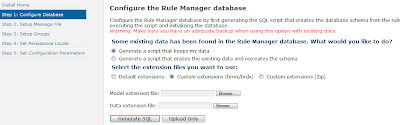
If you have any custom extensions model, make sure that you upload the .brdx and .brdm files on the Decision Center Installation Wizard screen.


API Changes
We encountered a number of changes in the API’s, this is not an exhaustive list but the ones that we ran into as part of an upgrade/migration.

Migration of Decision Center from 7.1 versions to 8.5 requires updating the APIs as well as any customized skin/branding being used.

API and Method Changes
  1. API changed from ilog.rules.teamserver.web.servlets.IlrDownloadServlet to ilog.rules.teamserver.web.servlets.IlrTestingDownloadServlet.
  2. IlrApplicationException needs to be handled if you are calling IlrDefaultSessionController.onCommitElement.
  3. IlrApplicationException needs to be handled if you are calling IlrDefaultSessionController.elementCommitted.
  4. API changed from ilog.rules.teamserver.web.servlets.IlrDownloadUtil to ilog.rules.teamserver.web.servlets.IlrDownloalUtil.
  5. IlrWUtils.getTimeZone() now returns an object of com.ibm.icu.timezone.
The next parts of this article will cover decision server, decision validation services customizations and other migration items.

To learn more about Prolifics, visit www.prolifics.com.


Ryan Trollip is Prolifics’ Decision Management Practice Director. Ryan is an experienced solutions architect and implementation lead with a strong background in business driven and improvement focused solutions with an emphasis on Decision Management. Ryan has a proven track record of delivering successful projects, with over 15 years of experience covering project management, enterprise architecture, account management, and design/programming in a decision management context. Prior to joining Prolifics, Ryan was an Architect and Technical Account Manager, independently and for IBM/ILOG, focused on leading the delivering complex decision management projects.


Amrinder Singh Brar is a Technical Lead for Decision Management at Prolifics. Amrinder has 8 years of experience in software development with 4+ years of extensive experience in ILOG/BRMS world. His key expertise lies in implementing Decision Management solutions in Banking, Telecom, HealthCare and Travel domains. Prior to joining Prolifics, Amrinder worked as a Solution Consultant for various ILOG migration and implementation projects with Telecom and IT majors.