Showing posts with label Social Business. Show all posts

Friday, March 28, 2014

Prolifics Employee Showcase: Handly Cameron

Handly Cameron is a Software Architect for IBM Collaboration Solutions (ICS) and Mobile at Prolifics and an IBM Champion for ICS. He has over 20 years of experience in enterprise collaboration and application development and is passionate about helping companies leverage social and collaboration technologies to drive business value.

We recently caught up with Handly to learn more about his time at Prolifics and some of the exciting initiatives he has worked on.

Joining Prolifics
Handly joined the Prolifics team over two years ago, stating that he saw great potential to grow in the IBM space and was impressed with Prolifics’ depth and breadth of experience across the IBM portfolio.

Technical Expertise and Becoming an IBM Champion
Handly was named an IBM Champion for ICS in the first group of Champions in June 2011. Since then, he has been selected as an IBM Champion each year and has earned 43 IBM certifications. In fact, he even helped the IBM team write 3 certifications, the most recent of which for the Worklight and WebSphere Portal developer exam. Currently, he holds 11 active certifications and continues to update them as product versions progress and expire.

Handly sees a lot of value in the IBM Champion program and has remained an advocate of the program since it was created. An IBM Champion is defined as an individual who leads and mentors others in making the best use of IBM solutions and services. Champions are typically evangelists who run user groups, are active in the blog community, help others in online spaces such as Skype or StackOverflow, present at conferences, and generally participate in the broader IBM community. Some of the benefits you can receive as an IBM Champion include:
  • Access to IBM Executives 
  • Opportunities to participate in community activities (i.e. Team Social and interviews at IBM Connect)
  • Free invitation to the ICS Leadership Conference
Handly encourages anyone wanting to become an IBM Champion to talk with him or another one of Prolifics Champions and find out how you can get involved!

Going Mobile: The Prolifics Connect App
Before joining Prolifics Software Group last year, Handly led the team that developed the Prolifics Connect mobile app that is used to support activities at large IBM conferences such as Connect and Impact. This particular project included helping several members of the Prolifics team learn mobile app development with IBM Worklight and integrating the app with back-end systems such as IBM’s sessions data, Twitter, and our blog feeds. Handly is currently updating the app for iOS7 and the upcoming Impact conference in late April. Click here to see the full story of the app.

Client Success
When asked about a recent client engagement he is most proud of, Handly recounted the planning and implementation of IBM Connections Content Manager (CCM) at Mizuno. Handly explains, “We were able to take a lead from IBM, demonstrate how the solution helped solve specific business needs, and sell the software and implementation services. Mizuno became the first customer to install CCM, with Mike McReady standing by to download the software the minute that IBM released the eGA. Following from this success, the customer was so happy with the results that they joined us in an IBM webinar last September that has been seen by hundreds of people. New leads are still coming in for customers who saw that webinar and want to hear more about how they can get similar results with Prolifics”. To listen to a Webcast replay, click here.

Interested in Hearing More from Handly?
He was recently interviewed by Sandy Carter at IBM Connect 2014. At the start of the video, you can see the blazing yellow Mizuno shoes Handly is wearing.


Connect with Handly Today!
www.twitter.com/handly
www.linkedin.com/in/handlycameron
handly.cameron@prolifics.com


Handly Cameron is an Enterprise Architect in the IBM Software Group at Prolifics and an IBM Champion for IBM Collaboration Solutions. He has over 20 years of experience in enterprise collaboration and application development and loves to help companies leverage social and collaboration technologies to drive business value. Handly is the Leader of the Atlanta WebSphere Users Group, recently finished 5 years as the president of Agile Atlanta, and holds 25+ industry technical certifications. He blogs at http://handly.org and is on Twitter as @Handly.


Tuesday, August 6, 2013

Integrating IBM WebSphere Portal 8 With IBM Connections Using Web App Integrator – Part 1

IBM Connections is a leading enterprise social software which provides social networking tools for businesses. Existing IBM WebSphere portal users are exploring ways to seamlessly integrate Connections into Portal. This article explains details of integrating WebSphere Portal with IBM connections using Web App Integrator portlet and Connection portlets.

In the first part of this blog series, I will give an introduction of Web App Integrator portlet and the necessary steps to install it in WebSphere Portal Server. In the second part, I will provide details of the configuration of Web App Integrator and IBM connections. The third and final part of this blog series will include details needed to install and configure Connections portlets.

WEB APP INTEGRATOR (WAI)
Web Application Integrator for IBM WebSphere Portal is a solution which allows external web applications to be integrated with WebSphere Portal. Generally there are two approaches used to access external web applications in portal. The first approach is to display the external application in a portlet in portal page by developing a custom portlet. The second approach is to include the entire external application inside a Portal page. WAI uses the second approach with more flexibility than the existing web clipping methods. There are no viewing area constraints (no scroll bars) in WAI and all Java scripts and links within the integrated Web App continue to function as expected. The user experience suggests that the user is still within the Portal environment even though they are, in reality, natively accessing Connections.

INSTALLING WEB APP INTEGRATOR IN PORTAL
Web Application Integrator portlet is available as catalogue version from the IBM Lotus green house. WAI can be downloaded from the following location. Users need to register with the site before downloading.

https://greenhouse.lotus.com

Once unzipping the downloaded file, webappintegrator.zip, users can see folders for the various portal versions. It has WAI portlets for portal 6 version to current 8.0.0.1 version. In earlier versions WAI was packaged as a web archive (war) file but for recent versions it’s packaged as portal application archive (paa) file. To install paa files we need portal solutions installer (si) but portal 8 has an inbuilt solutions installer so this is not needed for version 8.

To install deploy and configure the WAI we need to follow the below steps:
1. Determine the correct version of the WebAppIntegrator portlet that should be used (8 or 8.0.0.1) and extract the files in that folder.
2. Copy WAIPortlet.paa to a temporary directory on your portal server.
3. Make sure WebSphere Portal Server is running.
4. Open a command prompt window and cd to <wp_profile>\ConfigEngine

Execute the following config tasks for Windows:


Here temp dir name is the location of paa file (<wp_profile>\paa), was pwd and wps pwd are the was admin password and the portal admin password respectively. For UNIX its ./ConfigEngine.sh instead of ConfigEngine.bat. Restart the portal server.

TESTING INSTALLATION IN PORTAL
Before integrating with the connections, we can do a quick test to see WAI is installed as expected. Login to portal as administrator and then navigate through the administration-> Manage Pages, you can see the WAI portlet as below, with a button to generate the HTML script tag.


To test we need the following steps:
1. Create a test.html with following contents and place in the wps.war(located at <wp_profile>\installedApps\<cell name>\wps.ear\wps.war)
2. Create a URL page in the portal using the New URL button and set the URL value in the page property, in advanced section->HTML, set value as http://<servername>:<port no>/wps/test.html.
3. Create a unique name, as shown in the WAI test Page above.
4. Generate script through WAI portlet using the unique name.
5. Place the generated script in the test.html immediately after the beginning <body> tag.

Now you can test by navigating to the WAI test Page. You will see the page appear as below.


This concludes the first part of this blog series. In Part 2, we will see how to integrate the installed WAI with IBM Connections.

To learn more about Prolifics, visit www.prolifics.com.

Sanju Varghese, a Senior Consultant for Prolifics, is an experienced Portal and JEE Architect. He was with IBM Global services for six years delivering WebSphere Portal based solutions to its major customers and is certified in Java,IBM WebSphere Portal and BPM . He has performed different IT roles ranging from being an Architect, Consultant, Technical lead and Software developer for several large projects .Currently his main focus area is integrating Portal with Collaboration software. Besides specializing in IBM technologies he likes reading, traveling, watching and playing cricket. He holds a Bachelors Degree in Computer Engineering from Pune University, India.

Tuesday, July 23, 2013

Prolifics and IBM's Digital Experience Software: Enhance, Extend and Enrich...

by Niral Jhaveri, Vice President,  User Experience, Prolifics

Hopefully you got a chance to attend IBM’s recent digital experience launch.  I know we’re excited about the evolution in IBM technology which will provide our customers even better ways to personalize content for their site visitors. It also excels in the analyzing and optimizing of site and campaign performance to drive desired results.  For example, With IBM’s Digital Experience Software, we can further help our portal and collaboration customers develop and manage dynamic content and rich media while delivering multi-channel applications - providing the ultimate, optimized customer experience. Prolifics is dedicated to providing customers with solutions that promote collaboration, empower conversation and bring together communities. Leveraging IBM’s Digital Experience technology stack, Prolifics can assist companies:


Enhancing
Upgrade to IBM Digital Experience
Migrate systems from older versions to IBM Digital Experience

Extending
Multi-channel extension of applications to mobile and tablets
Extend business applications beyond conventional desktop
Creating a mobile strategy

Enriching
Conduct health checks on aging applications
Provide tuning to improve performance and improve application longevity

Check out our latest video to see Watch for more on how Prolifics empowers businesses with mobile, social & collaboration.


Wednesday, February 13, 2013

Prolifics Thought Leaders Named IBM Champions in 2013!

The IBM Champion program recognizes innovative thought leaders in the technical community. An IBM Champion is an IT professional, business leader, developer, or educator who influences and mentors others to help them make best use of IBM software, solutions, and services.

Meet Prolifics' 2013 IBM Champions!
Prolifics is proud to announce that 15 of our thought leaders have been recognized as IBM Champions for 2013. Prolifics has long demonstrated technology leadership through deep skills, a proven methodology, and high customer marks. Our technical staff has consistently developed innovative and creative solutions for Prolifics' clients and has dedicated themselves to rigorous and ongoing training - raising the bar and bringing thought leadership to the entire industry. Many of Prolifics' Champions selected by IBM have been published in several trade journals and often speak at conferences. Additionally, their custom-solutions implemented for customers worldwide have been honored with several awards.


Congratulations to all of our IBM Champions!

Handly Cameron - ICS
Laks Sundararajan - ICS
Alex Ivkin - Security
Dan Kern - Tivoli
Greg Hodgkinson - Rational
AJ Aronoff - WebSphere
Steve Fraser - WebSphere
Leland Irwin - WebSphere
Eric Markowitz - WebSphere
Vladimir Serebryany - WebSphere
Ashraf Souleiman - WebSphere
Prithvi Srinivasan - WebSphere
Neha Dhawale - WebSphere
Arup Datta - WebSphere
Rajiv Ramachandran - WebSphere

To learn more about our IBM Champions, visit: http://www.ibm.com/developerworks/champion/
For more information about Prolifics, visit: www.prolifics.com

Friday, February 8, 2013

Building Social Media Toolbars on WebSphere Portal 8

The Business Case
Social Media Toolbars are a popular user interface pattern for many websites today. Providing links to your social media channels helps promote your brand, connects users to your social venues, and can aid both the user and the site owner in communicating information through additional channels and formats. This article discusses an approach to building social media toolbars that can be re-used in your WebSphere Portal 8 themes. You can optionally allow business stakeholders some ability to manage the social media links including; changing the order of links within the toolbar or activating and deactivating individual media links. This solution may also allow you to leverage the features of Portal security and personalization to allow for advanced targeting scenarios.

In the simplest implementation you might implement the html markup for the social media toolbar directly in your theme html or a dynamic content spot using a JSP file. The hard coded solution is extremely simple and may be acceptable if you have no need to for any of the following: - You have no need to share the links across themes. - You don’t need any personalization capabilities or security authorization. - You are comfortable with a development and deployment cycle to manage the links.

However there is an alternative approach that is nearly as simple to implement and allows much greater flexibility and re-use. We want to store the social media bar links in our portal page taxonomy under a hidden page label. When we do this, we can then preserve the same links across themes and allow the theme to read and display the social media links.

The Implementation
First let’s setup some basic custom theme helper code.

In the dynamic content of a your custom theme locate the file includePortalTaglibs.jspf and add the JSTL core taglib.


Next, we want to be able to locate all external links under our hidden portal label. To do this we are going to use a custom uniquename for our label so we can find this label using the Navigation Model SPI. In order to get the navigation node for the uniquename we create a helper function in the helper.jspf called “getNodeByUniqueName”.

Add the import statements highlighted below in the file named “helper.jspf”:


Next, we’ll use a JSP Init method to perform the JNDI lookup of the navigation model home. We also declare the instance members for “navModelHome” and “ctx”.


To complete our helper code we implement our helper method in the JSP static block.


Now we have a helper method to return a NavigationNode for a given uniquename string. Keep in mind this method may throw runtime exceptions in certain scenarios. Later for our case we want to invoke this method in a way that catches any additional exceptions beyond the checked ModelException. Users of this helper method should also check for a null return value.

Next we need a new dynamic content JSP page to render our social media bar.

The code listing is given below:


The above code listing deserves some explanation. In the declarations at the top we include our helper and common tag library includes.

Next we look for two parameters. The first is the uniquename of social media label from Portal - Manage Pages portlet that contains our external links and metadata. The second is an optional parameter for a separator markup we optionally may place between groupings of items in our social media bar. When possible you should try to achieve this using CSS instead of the separator markup parameter.

In the next section we call our helper function “getNodeByUniqueName” in order to get the NavigationNode to iterate over. We conditionally process the lookup of children under the navigation node if the social node is not empty.

We initialize a category variable to track changing from one grouping of social links to the next. This is our indicator to output the separator markup.

Next, we use the Portal EL Beans to get the metadata for each external URL managed by the portal:

  • link.css.classname
  • link.category
  • “Page Icon” property


With this we conditionally output the separator markup, and finally we output a link using the CSS class name from the page properties.

The image icon URL is optional and changes the content of the anchor tag. Depending on how you wish to implement the social media icons. You can use CSS for the anchor tag alone to render the images. If you provide the icon URL the tag is used. Using CSS only may be preferable as you can use glyphicons.

Now that we have a JSP to render our social media toolbar, we can place this into the static resource(s) of our theme as a dynamic content spot. You can register the dynamic content spot as a theme resource environment provider property per – “Creating a dynamic content spot”. For the purpose of this article we’ll simply use the resolver URI directly.

The code listing below shows adding the social media bar dynamic spot to the “theme_en.html” file:


Note the protocol and URI resolves to our JSP in the anchor with relation attribute of “dynamic-content.” We also give the uniquename parameter in the query string.

This is total code needed to implement the solution aside from site specific css.

Portal Page Management
We need to create our Portal Label and add some links. To do this; navigate Portal Administration and select Manage Pages.

Navigate to Content Root > Hidden Pages. Create a new Label under Hidden Pages.


Enter “Social Media Links” under the title, and give the label the same uniquename you used when creating the dynamic content spot.


Next, add a new URL under the Social Media Links label


In this example, I used an image for Page Icon property. If you wish to set page parameters for link.category or link.css.className you must first click Ok to Save the URL. You then return to edit the URL and can modify the page metadata. An example of this appears below:


The screen capture below shows a representative URL’s Page Parameters being set.


Repeat the URL creation process for each link you wish to show in the toolbar.


The Rendered Output
The social links created in Page Management will now be presented in the theme(s) that render the social media bar dynamic content spot.

Conclusion:
This is one possible solution to building social media bars in WebSphere Portal 8 Themes. The solution allows a Portal administrator or business user to create new toolbar items (excluding the supporting CSS or images.) The same user can activate and deactivate a link. The links in the toolbar can be reordered. The links could be different for authenticated users based on a user’s identity by using “assign permissions” or by using personalization rule mappings. Most importantly the link data is decoupled from a particular theme and its presentation of the links.

Tim Reilly is a Technology Manager with Prolifics. He has led the implementation of many global projects using IBM WebSphere Portal and has extensive background in design and development of enterprise portals. He specializes in providing Enterprise Java and Portal solutions leveraging WebSphere Portal, Content Management, Tivoli and 3rd party integrations. He has over 10 years of experience with Websphere Portal and is a former Apache Software Foundation committer.

Tuesday, November 27, 2012

Social Business FutureCast hosted by Prolifics & IBM

Earlier this month, Prolifics' Handly Cameron participated in a Live Social Business FutureCast. The panelists discussed what the future will look like for midsized businesses who adapt to the agility of social business culture and practices.

The panelists shared their views on why a midsized business should adopt social business practices now to prepare for the new demands of business in the next year and in the next 5 years.

View the replay of the Social Business FutureCast below!


Be sure to follow the panelists and tweet any questions or comments!
Handly Cameron, Prolifics
Ed Brill, IBM
Laurie McCabe, SMB Group
Geoffrey Colon, Ogilvy & Mather
Luis Suarez, IBM

For more videos from IBM Midsize Business, visit the YouTube channel.

Looking for more information?
Visit IBM's Midsize Business Solutions website
Visit Prolifics' website

Wednesday, January 11, 2012

Exceptional Web Experiences 101

As I continue to prepare for Lotusphere 2012, I am reflecting on my experience last year at the conference in 2011. At Lotusphere 2011 there was lot of attention on providing an “Exceptional Web Experience” to the customers. And rightly so. At the end of the day, it’s all about making the customer, the end user, the client (or whatever they are called) happy. There can be a lot of misconceptions in the User Experience space about the concept of “web” experience”

So I asked my self this question: Is an iGoogle Page (that I view every single day) a good web experience?


Sure enough, the iGoogle page provides me with the information that I need. But to get the information, I had to enter my zip code 5 times and my address a couple of times. And none of the snippets or widgets of information talk to each other. Is this what you would call “Exceptional”?

This year, I participated in a few IBM Social Roadshows last year and I decided as part of Prolifics commitment with IBM I would talk about the whats and hows of this social experience and also present some trends in the space.

So what exactly is an “Exceptional Web Experience”? How do you achieve it?


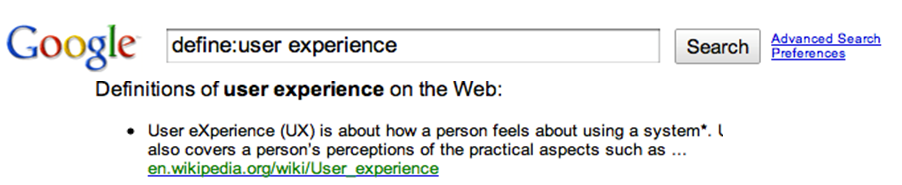
When I looked up the meaning, I found the following answer: “it’s about how a person feels about the system”. To me that said it all, but the real question is how do you design the user experience (UE) so that it makes the end user feel good about the system? How do you attain the level of excellence?

According to me, these are some of the key drivers in creating a great User Experience
1. It’s about Relevance - Create highly personalized customer interactions

2. It’s not only just about the product - Design experiences, not features

3. Go beyond the desktop or laptop - Having a mobile presence is a must

4. Earn the trust of the customer - Improve customer loyalty and relationship by enabling “Social”

5. It’s about Web 2.0 and beyond… Web 3.0 - Visual Appeal + Ease of use = Wow customers. Keep the UI Simple, Interactive and Responsive (SIR principle)

For over a decade, IBM WebSphere Portal has led the web 2.0 space in providing a seamless web experience. But now with the help of its accelerators (Social, Collaboration, Mobile etc) it’s poised for providing greater results in the enterprise business and social space. IBM WebSphere Portal delivers greater flexibility by creating personalized web experiences that seamlessly combine back-end applications, commerce solutions, social media sites, and cloud-based services.

Speaking of Social, there is phenomenal potential in the power of introducing “Social” into day-to-day business.

I have observed some trends in how customers and clients are using the power of social to engage customers.

Social Trend #1 - Engage the Customer on the Site

This is the single biggest focus of most customers and clients. Two questions that normally arise in a UE discussion are: how do we keep the user engaged on the site? How can we have share information with users and between users?

Answer: Leverage Social. By Enabling Users to Socialize:
  • Share conversations and information between users
  • Wikis, blogs, forums, communities
  • Ratings, commenting, tagging
  • Shared bookmarks, files, activities for work & ideas
Search
• Based on profile: expertise, projects, responsibilities, and interests.

Customer Service
• Enable customers to get problems resolved quickly with click-to-chat functions.Provide them targeted results

Social Collaboration
• Improve brand awareness by syndicating content across the web, into other online properties, such as Facebook, Twitter, Google etc.

IBM WebSphere Portal provides a great point solution to start your social initiative. Concepts like tagging and rating are essential components for developing collective intelligence about the site/product. They have also proven useful in engaging customers on the site and creating a trust and a sense of community between the end of users. Out of the box templates like Blogs, Wikis, Newsletters, Communities have made it very easy for clients to share information with the users. (Requires no development, only customization). Tools like click-to-chat, integration with RSS feeds from external sources like Facebook, Twitter, Google etc have added a great social dimension to Portal which was always perceived as “single point front end solution to IBM SOA framework"


Now if your business is ready for a more mature Social strategy IBM Lotus Connections is the right solution. To highlight some of the key features that product presents
• Profiles – Find people and expertise in your social network
• Community - Connect with people of common interests to share ideas
• Forum - Start discussions to solicit feedback from end users
• Activities - Dashboard of to-dos and activities within your network
• Files - Share variety of artifacts with your individuals and groups


Social Trend #2- Expand Beyond Traditional Web

There are 4.6 Billion mobile customers. To me it means 4.6B reasons to expand the outreach of your products to beyond traditional desktop. Having a mobile presence does not mean that users can access your site via a smart phone. But a true mobile experience comes from having a site to adopt the rendering process based on the smart phone. UI elements like themes on the portal pages, the navigation schemes should be able to differentiate between an iPhone or a Blackberry or any other smart phone.

Keep in mind the following consideration for developing a mobile strategy

  • Create a device agnostic presentation
  • Utilize common business logic and services
  • Cater to device specific requirements (iPhone maps, geo location etc)
  • Create lots of screen presence despite limited real estate
  • High Response time despite broadband limitations
  • Leverage one common theme

There are several questions in this space. What sort of a mobile strategy should customers adopt? Should I create a native iPhone app? What about a mobile website? What’s the buzz about HTML 5?


Consider your requirements before choosing a solution. Here are some options


There are several other options for non-Portal, non-IBM based customers as well, such as using one of the open source mobile and HTML 5 based frameworks.

Social Trend #3- Optimize the Experience with BI Analytics

One of the focus areas in social business is optimizing the experience based on real-time data, site usage and social analytics.
  • What drives BI Analytics?
  • Who is coming to my site?
  • How did they find it?
  • What are they doing?
  • What did they search for? Did they find it?
  • What are the most popular areas?
  • What are the most popular topics/content?

Leverage analytics to:
  • Improve user engagement by measuring and then fine tuning the customer experience
  • Intelligently manage your marketing resources
  • Make better decisions faster
  • Exceptional web experiences engage, attract, satisfy and retain customers and partners.
  • Being nimble and agile is required to keep web content fresh, engaging and relevant.
I look forward to seeing how these trends have evolved since Lotusphere 2011 and discover new trends to look for in 2012. Click here to see what Prolifics has in store for Lotusphere next week, including information about our 4 speaking sessions.

Niral Jhaveri is the User Experience Practice Director at Prolifics and has extensive expertise in the IBM Lotus, WebSphere and Rational family of products. He has played a key role at several strategic clients by providing technical leadership. Niral has an extensive background in the design and development of IBM WebSphere Portal, SOA and Web 2.0 applications with a proven track record of consulting and architecting solutions for several industry verticals like Finance, Retail, Insurance and Technology.

Wednesday, December 28, 2011

A Social Approach to Solving Business Problems

In today’s world of empowered individuals, world leaders and businesses must use potent new technologies and harness social media to organize themselves, to show authenticity, fairness, transparency and good faith.

Social can be categorized broadly into: socializing with your external subscribers and socializing with your own employees. In order to maintain a healthy relationship and get active feedback, a system that enables subscribers to provide an honest opinion that lets you address the issues and concerns in a timely manner is critical to business. Facebook, G+, Twitter, and Foursquare are established open platforms that can very well engage these external subscribers. Another way to engage and socialize with your subscribers is through a secured and controlled platform, your own corporate portal, which empowers your subscriber with information that they need, when they need it and how they need it.

Social engagement within an organization can be looked upon as socializing between the employees, departments, channels etc. The synergy that you can generate through a true social enterprise can show dramatic ROIs on your record books. IBM Connections is one such product that helps organizations create an internal platform that they can leverage to manage internal and external social networks. Connection's mobile capabilities ensure that employees are connected 24/7 across the globe providing the best possible value to subscribers. In conventional systems, information flows via emails; appreciations, issues and suggestions are shared in a closed loop. However, with Connections they are discussed openly, bringing in the necessary empowerment and transparency to work culture.

Discussing a business requirement with one of my customers, I realized how the Social aspects between External subscribers and Internal Employees could be bridged using an IBM Connections platform. The customer wanted to revolutionize information exchange between their subscribers and customer service representatives. As subscribers login to the Web Portal, they would receive a highly personalized set of alerts, links to blogs and content relevant to their preferences. The subscriber can ask questions, share their concerns or any other appropriate information including rich media with the customer service representative. As we worked with the customer through this requirement to identify relevant COTS Products, IBM Connections came in as the closest fit. Given the social value provided by IBM Connections, the decision was an easy one for the customer to make.

A social approach to solving common business problems can help businesses optimize their processes, bringing in necessary transparency to their subscribers and employees. It also adds a different dimension to the traditional delivery approach by promoting an active engagement between various stakeholders.

To learn more about Prolifics' social business solutions, click here or visit our website at www.prolifics.com.

Prabhakar Goel is a Solution Architect with Prolifics and a key member of highly specialized team of IBM WebSphere experts involved in architecture and delivery of Business Integration solutions, High transaction commercial portals and Solutions based on Open source technologies. He is an expert providing End-to-End SOA implementations utilizing IBM suite of products like Portal, Connections, Content Management, Process Server. He holds Masters in Software Systems from BITS, Pilani and a Graduate Degree in Electrical Engineering from Kurukshetra.

Thursday, December 22, 2011

Why I think Lotusphere is a Great Event

It’s that time of the year again. As we enter the holiday season, I’m already looking forward to starting the New Year with an overview of the latest industry trends and learning about new technology opportunities.

I always felt that it would be nice if someone could give me a quick session and bring me up to speed with technological changes that happened over the past year; what others did with technology and how it helped them, some hands on labs where I could touch and feel all these new technologies in order to increase my confidence when recommending a solution. Lotusphere is just about that for me - it’s a dream come true; exactly what an IT Manager, Decision Maker, Architect, Developer would love to start the year with.

Lotusphere offers Jumpstart sessions to know and understand new products and get a personal touch and feel for them. You get to look out for new technologies offered, their business value, implications, and related opportunities.

In short, Lotusphere features:
  • Sessions that provide a comprehensive, step-by-step detail on specific technologies
  • Sessions that provide practical solutions that others have used for solving complex problems of new technologies
  • Sessions that cover a breadth of topics from core development skills to those needed to build social applications
  • Sessions that talk about the latest features and product capabilities, deployment techniques
  • Sessions on product architecture specifically helpful in planning future data center needs and possible opportunities in that area for being creative
If this dose of solid knowledge foundation wasn’t enough, you get to meet and discuss with IBMers from across the globe that are part of design and development teams across most of these technologies. In general, you wouldn’t get to meet this many IBMers under one roof even if you visited an IBM office. Lotusphere presents a great opportunity for every one to socialize and interact with like-minded people, visionaries and thought leaders of the industry.

Finally, the amount of business opportunities Lotusphere presents for everyone is unlike any other show. I have met many of my current customers at previous Lotusphere conferences and had opportunities to interact with them and share how the latest technologies can be leveraged to solve even their toughest business challenges. I make sure to bring many of my customers to Lotusphere so that they can gain knowledge on new trends and technologies. It makes it much easier for me to discuss these new technologies and apply them to their current business problems.

And for me the fun just doesn’t end there; it’s a welcome break from the snow and freezing temperatures of Colorado to spend a week in the warm setting of Orlando!

Prabhakar Goel is a Solution Architect with Prolifics and a key member of highly specialized team of IBM WebSphere experts involved in architecture and delivery of Business Integration solutions, High transaction commercial portals and Solutions based on Open source technologies. He is an expert providing End-to-End SOA implementations utilizing IBM suite of products like Portal, Connections, Content Management, Process Server. He holds Masters in Software Systems from BITS, Pilani and a Graduate Degree in Electrical Engineering from Kurukshetra.

Thursday, December 15, 2011

What I Am Looking Forward to at Lotusphere 2012

The main theme of Lotusphere 2012 is ‘Social, Mobile and Cloud’. I would like to use the acronym MoSCo for the same. 2011 represented a key year in terms of a key shift from PC to Mobile world i.e. the year in which Smartphones and tablets will out ship PCs for the first ever time. Consumers no longer use Desktop as the sole channel to access to Web and this opens a window of opportunities in the Mobile and Cloud space.

Lotusphere has over 300 sessions scheduled over one week’s time and it would be a truly overwhelming task trying to come up with a schedule. The complete list of sessions can be viewed at:
http://ibmtvdemo.edgesuite.net/software/lotus/lotusphere/lssessions.pdf

Each session is unique and a lot of homework needs to be done to come up with a schedule that caters to individual needs. Since I’m specifically interested in developments in the mobile space particularly enterprise adoption and multi channel delivery I’m looking forward to the following sessions:
  • SPN204 Harnessing the Power of Enterprise Mobility
  • BP210 From Desktop to Mobile and Smart Phones – Lessons Learned: Taking Web Applications Mobile
  • AD301 Developing Exceptional Mobile and Multi-Channel Applications using IBM Web Experience Factory
  • AD302 Deliver Rich Mobile Experiences with IBM WebSphere Portal Mobile Theme
  • ID228 What's New in IBM Connections Mobile
Considering the MoSCo theme of Lotusphere, I’m keeping an eye on the following sessions too, depending on my schedule:
  • SPN213 The Future of Social Business: A Faculty Panel Discussion
  • SPN207 Securing and Connecting the Cloud: Insider Tips on Successful Cloud Adoption Strategies
  • INV302 Strategy in Action: IBM Mobile for Social Business
  • BP105 tick.tick.tick.tick. #! It's time to Evangelize, Educate and Energize your users to Get Productive, Get Social and Do BUSINESS!
  • GEEK101 SpeedGeeking!
Another thing I’m really looking forward is the ‘Meet the Developers’ lab. I plan to meet up with folks who worked on ‘Web Experience Factory’ to understand how they tailored the product to suit various delivery channels. Customers are looking for solutions that address multi channel delivery and ‘Web Experience Factory’ addresses the concern in a seamless way. It would be fascinating to go behind the scenes and work with engineers who designed the product.

Finally, I can’t wait for the Wednesday Night Party, a must go for attendees and Blogger Open on Thursday afternoon. There is so much more at Lotusphere than all the wonderful sessions.

Laks Sundararajan is a Solution Architect with Prolifics and a key member of highly specialized team working on IBM WebSphere Portal, Content Management and Collaboration technologies. He has led the implementation of many global projects using IBM WebSphere Portal and has extensive background in design and development of enterprise portals. He specializes in providing Enterprise SOA solutions leveraging WebSphere Portal, Content Management, Tivoli and Mashup’s. He holds Masters in Information Technology from Carnegie Mellon University and a Graduate Degree in Engineering from BITS, Pilani.