Monday, May 24, 2010

Why we love using Rational Team Concert to automate the build, deploy and test of WebSphere applications

Greg Hodgkinson, Methodology Practice Leader


Team Concert continuous integration for WAS, WESB, WPS, Portal and WMB?


So you love what you’ve heard about the benefits of Rational Team Concert for improving the development performance of Java development teams, but you’re wondering if it works just as well for your WebSphere Application Server, WebSphere ESB, WebSphere Process Server, WebSphere Portal Server or WebSphere Message Broker applications?


Well wonder no more – it does!


Being better at delivering better solutions


First some background.


Here at Prolifics we specialize in helping our customers deliver business solutions running on the various WebSphere runtime platforms. In fact we’ve delivered so many that I don’t even think marketing keeps count anymore! And as we have such a focus on software development, we are especially interested in any solution that allow us to do a better job, more efficiently, and greater ease.


This explains why we love Team Concert so much.


• From the point of view of a project manager – the always-up-to-date visibility of exactly what is going on at any point in time, what issues the team is facing, the current progress trend, what has been delivered most recently, what tasks are overdue, what the current status of the build is – all combine to allow a greater level of control over the project. They say control is an illusion, but an informed project manager is more likely to make the right choices for the project.


• From the point of view of the developers – the powerful but easy to use source control with private back-up space on the server from where changes can be shared with others and accepted from others, the ability to easily pause changes and switch over to another piece of work, the feed of information of what the rest of the team is up to, the prioritizable to-do list of work items, and the powerful build automation engine that allows the build/deploy/test process to be automated and provides automated feedback on the quality of code being delivered to source control – these features allow developers to be far more productive and to operate as a team with far greater confidence that they are on the right track.


• From the point of view of testers – the ability to interact directly with the developers using the same collaboration platform that they do, with a tightly integrated round-trip from defect, to code fix, to build, to release – increasing the efficiency of not only reporting and fixing the defects, but getting fixes back out to the testers to be re-tested.


• From the point of view of the business (our customers) – they see an improved predictability in project delivery dates, increased quality in the solution delivered, reduced times to fix defects, improved visibility into the activities of the project team, and insight into what it is that is being delivered – all which mean that project budgets will be signed off with a high certainty of success.


Simply put, the tool has been revolutionary in helping us being better at delivering better solutions for our customers.


Continuous integration is vital


An important factor in our success with Team Concert is its build engine. Continuous builds are well known to be a highly effective way to improve the coordination and efficiency of a team of developers and Team Concert’s build engine does this brilliantly – along with the change sets (source control component) and work items (work item tracking component) that it traces to and from, and the dashboard that exposes its results and outputs to the team and beyond.
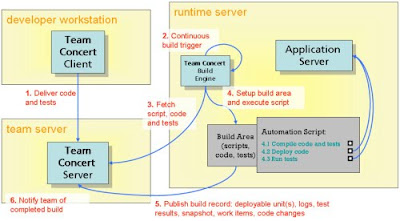


The process is simply and yet the effects are powerful.


1. Developers deliver their code changes, along with suitable unit tests that verify the correct operation of their code.


2. The Team Concert build engine will trigger the build either based on a continuous interval or a defined schedule.


3. The build engine fetches the code changes, the unit tests, and the automation script that will drive the build.


4. The build engine sets up a build area containing the code, the tests and the automation script, and then executes the script. Depending on the script used, it can automate a number of steps involved in creating a candidate release of the code, for example:

a. Compile the code and unit tests

b. Deploy the code to an application server (normally a dedicated continuous integration testing server)

c. Run the tests to ensure that the deployed code works correctly.


5. The build engine then publishes a build output record which has immense value to the team. This record contains the deployable unit(s) produced by the build, the logs that were produced as a result of the build activities, the results of running the unit tests, a snapshot of the exact configuration of code, tests and automation script that the build engine used, and the contents of the build both in terms of the work items and code changes that went into it.


6. The team is notified of the results of the build via a number of mechanisms: the build will appear as a notification in each team members IDE, an entry in the project feed on the dashboard, a new build in the builds section of the dashboard, a new entry in the team central view. If there has been a failure, then everyone will know about it, and the team can get straight to work on correcting the issue.


Permanent point of reference for releases
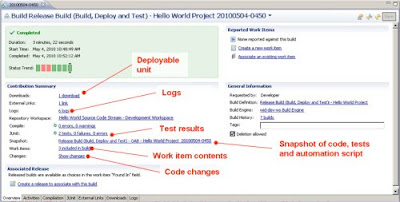


This build record forms a permanent record of the build that is immensely valuable to any future developers or release engineers that need to understand that particular build. They can very quickly determine what went into the build and what was produced by the build.


Neutralization of integration errors


A key step in the automated process steps described earlier is the “Notify team of completed build” step.


This is important for two reasons: Firstly, any further steps required to take place such as smoke tests can now take place, so notification is important.


Secondly, and most significantly, if the build failed it is important that the team is aware so they can take steps to correct the causes of this failure. Having a broken build is a bad situation because it means that the quality of any new changes that are delivered cannot be verified, so it is important that steps are taken immediately to rectify the problem.


Normally the responsibility falls with the developer whose delivery broke the build to correct things, but it is important that the whole team is aware of the situation. It doesn’t take long for developers to learn how important it is for the broken build to be fixed, and we’ve found that this detect-notify-correct process becomes very efficient at neutralizing integration errors that could otherwise require far more effort to correct once they are compounded and confused by further changes.


Zero “wait time” to produce a release


Every build is a candidate release! Or at least every build that succeeds . No more delays having to request a release engineer to create a release of the code, waiting while they gather the correct source and scripts to produce the release, and then manually deploying the release for smoke tests. Essentially every time a successful build has run you have a potential release ready for smoke tests. The “wait time” has gone down to zero.


Prolifics “project-proven” on all WebSphere platforms


To get back to the original question: Continuous integration with Team Concert is all very good and well for Java projects, but what about more advanced applications built on WAS, WESB, WPS, Portal or WMB?


Well you will be glad to know that it is exactly these kinds of projects where we have seen the most benefit out of using Team Concert’s build engines – especially those projects where there is a combination of technologies involved. We have successfully used the Team Concert build engine along with our own automation scripts to realize the benefits discussed above (permanent point of reference for releases, neutralization of integration errors, and zero “wait time” to produce a release) and many further benefits in building applications across all of the WebSphere platforms.
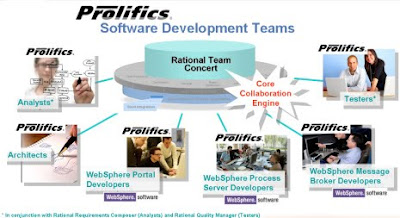


New starter scripts solution available on IBM Global Solutions Directory


Would you like to use your Team Concert build engine to automate the build, test and deployment of WAS, WESB, WPS, WMB or Portal applications? If so then our starter automation scripts are ideal to get you up and running quickly.


Contact us to arrange a no-obligation demonstration where one of our build engineers can show you how the solution can be used to speed up deliver on your target platform.


See the new listing in the IBM Global Solutions Directory for further information and also watch this video!


Greg Hodgkinson is the Methodology Practice Leader at Prolifics. He has worked in software architecture since 1996, initially in the field of component-based development (CBD), then seamlessly on to service-oriented architecture (SOA). His extended area of expertise is the software development process, and he assists Prolifics and IBM customers in adopting agile software development processes and SOA methods. Complementing this is his expertise in software development environment architecture. He is still very much a practitioner, and has been responsible for service architectures for a number of FTSE 100 companies. He presents on agile SOA process and methods, has co-authored a Redbook on SOA solutions, and regularly writes for DeveloperWorks.

Wednesday, February 24, 2010

Lotusphere 2010 and Mobile Portals

Don Sheppard, Solution Director

One of the most interesting sessions I attended at Lotusphere 2010 was not about a new version with enhanced features, nor about a new product that will revolutionize the industry. It was a simple session on taking existing portals and making the content display better on mobile devices using the IBM Mobile Portal Accelerator.

Viewing web content on phones and PDAs has been around for a number of years, but in the last year it has really caught on. During 2009, we saw a large increase in the amount of smartphones in use. Apple shipped the new iPhone 3GS, Google Android-based phones like the Nexus One and Droid gained traction, and companies added more types of Windows Mobile-based phones.

As the popularity of interacting with the web using a phone continues to grow, more companies will want to make access to existing content easier on mobile devices. Some companies will build custom applications targeted to devices like Androids or iPhones, but others will not have the time or resources to build device-specific applications. For those companies who want to optimize the mobile user experience of an existing Websphere Portal application, the IBM Mobile Portal Accelerator provides them with the tools and a runtime engine that can optimize the display of a portal page for over 7000 devices.

Historically, creating a site accessible to mobile devices meant stripping out all visually appealing elements and presenting a bare-bones, text only version. This was because every device would render the content differently and few supported advanced technologies like Flash or Javascript. Also, the way a user interacts with a website on a desktop machine is very different than how a user interacts with a site on a mobile device. Desktop or laptops screens tend to be wider than they are tall, so most sites use navigation elements on the top and left sides of the screens. This type of navigation doesn’t work well on mobile devices where the screens are narrow. To deal with these issues, companies could create a mobile page and format the page to support the lowest common device, but this sacrifices the robust experience possible on new devices. Today’s mobile devices still have vast differences; for example an Apple iPhone has a 320 x 480 pixel screen, Rim Blackberry has 320 x 240 pixels, and Google’s Nexus One has a whopping 800 x 480 pixel display.

Mobile Portal Accelerator solves the problem of supporting different types of mobile devices by maintaining a database of device specifications where the attributes of over 7000 mobile devices are mapped. By abstracting the page layout, items can be formatted and converted to provide an exceptional web experience on each device.

Mobile Portal Accelerator uses XML Device Independent Mark-up Extensions (XDIME) to describe the content. One set of XDIME is created to map UI elements and Layout Policies are used to determine where content is shown on mobile devices.

Using XDIME reduces the time to deliver content, because one set of markup is created and can support all devices in the database. As new devices are introduced, a subscription service is available to provide updates. This means a developer no longer has to be concerned with updating the application as new devices are introduced.

Mobile Portal Accelerator is currently available for the IBM Websphere Portal 6.1 platform, supports the publishing of Lotus Web Content Management content, and widgets. It also features eclipse-based plugins called the Mobile Portal Toolkit which works with RAD and RSA to develop and test portlets.

Don Sheppard is a Solutions Director at Prolifics and Master Certified IT Architect. Don spent 13 years at IBM and was former CTO of their National Portal Services practice before working for Prolifics.

Tuesday, December 22, 2009

Integrating MQ FTE with WebSphere Process Server/WESB

Ivan Smirnov, Senior Consultant

WebSphere MQ File Transfer Edition (known simply as MQ FTE) is a robust managed file transfer solution built on WebSphere MQ transport backbone. Product page is here: http://www-01.ibm.com/software/integration/wmq/filetransfer/index.html

This product is a recent addition to the storied and extremely stable WebSphere MQ – it came out after MQ version 7. I was excited to hear about its release because it creates new possibilities in file transfer that FTP, SCP and the like never delivered – like reliability and tolerance of transient network failures. Immediately a question arose: how can we take advantage of these new capabilities in IBM’s middleware. What is the best way to integrate IBM’s premier integration platform, WebSphere ESB (and by extension, WebSphere Process Server) with MQ FTE?

Integration between WESB and MQ FTE will occur on 2 ESB boundaries: module exports that receive files from MQ FTE and module imports that send files to a remote destination via MQ FTE. I argue that the simplest integration approach is also often the best.

On the SCA export (send files via MQ FTE) side, we will configure MQ FTE file transfer using the tool’s native interface (command line or GUI). We then will use Flat File adapter in outbound mode to create a file on local file system where it will be picked up by MQ FTE. Protection from incomplete file pickup is provided by using staging directory, which is built into Flat File adapter.

The following alternatives are possible:
1) Construct the whole MQ FTE messages on the fly in WESB (for instance, by engineering an MQ FTE import binding)
2) Put file on file system the same way, using Flat File adapter, but initiate transfer by putting a request message on MQ FTE agent queue.

The first alternative approach requires duplicating a lot of code that is already in MQ FTE while providing minimal savings in terms of disk I/O. It is not a worthy alternative.
The second alternative approach is close to the original design. However, there is no need to predefine file transfer – this will be done by sending an XML message to administrative queue of MQ FTE. Its benefit is zero administration effort, but it requires some upfront custom development.

On the SCA import (receive from MQ FTE) side, we can configure MQ FTE to transfer files to a local WESB file system. Files will be picked up by Flat File Adapter in inbound mode. MQ FTE has built in protection against picking up incomplete files.

As an alternative, it is certainly possible to receive MQ messages in WESB instead of letting MQ FTE create files on file system. This alternate solution will require complex code largely duplicating existing MQ FTE functionality to extract file payload from MQ messages and handle file-level acknowledgement and auditing. The only upside would be avoiding disk I/O by skipping writing file to file system by MQ FTE and reading it in by Flat File adapter. There is not much value in this, since at such high volume WESB will reach capacity much sooner then disk I/O becomes a bottleneck. This alternate solution is all cost and no benefit.

Conclusion: when integrating MQ FTE and WPS (WESB), simplest solution is very reasonable and will work best in many situations.

Ivan Smirnov is a Senior Consultant at Prolifics with extensive hands-on experience with the WebSphere family of products (including WebSphere Application Server and Process Server, WebSphere Studio/Rational and WebSphere MQ), Tivoli security offerings (including Tivoli Identity Manager and Tivoli Access Manager for e-business), DB2, XML and Web Services. With strong technical skills both in development and administration, as well as deep troubleshooting skills, Ivan handles aspects of implementation installation, configuration, securing and tuning/troubleshooting to development and architecture within a J2EE environment. He also possesses key Application Server migration skills and has helped several customers’ transition to the WebSphere platform from other J2EE platforms.

Tuesday, December 1, 2009

Good design and usability principles

Alex Ivkin, Senior IT Security Architect

I am a big proponent of usability. After all, regardless of how good something is, or how many cool features it has, if it is unusable – it is worthless. A hard to use application, website or in fact anything that interacts with a human, will not be popular, will lose out to competition or be ignored altogether. There are many articles on the web with examples and lists of usability principles, so I would not go into that here.

It seems, however, that many sites, like ss64.com or useit.com, suffer from a common pitfall in usability design, sacrificing design by going too far. They subscribe to the lowest common denominator in an effort to make it usable to the biggest possible crowd. This makes them very plain and downright ugly. Sure, they cover the 99% of the crowd out there, not the 95% a good design would cover, but in the push for these extra 4% they lose much in the beauty and attractiveness.

Ever wondered how Apple design wins praises so much? It’s not only created with usability in mind, it is also very attractive. Good, usable design after all has clues that are beyond simply making it readable or understandable. The clues are like little streaks of color on a bland background that make it come alive, make it stand out and win over a more “usable” background for most of people out there. Combining a creative effort with a usability agenda is the winning combination.

With that in mind here are the good usability design principles:

  1. Start with a use-case. Run through how you think the users will approach the tasks and navigate through. You will be wrong, but that’s a start.
  2. Think how it could be simplified. In many cases the simpler is the better. Many designs, like a single hand faucet handle, start off designed for the ease of use with simplicity and then they win over. Assume you are designing for people who are resource constrained: “the less brain I can devote to this task the better”
  3. Be creative. Think how you can make it more attractive.
  4. Consider performance. Yes it is a big usability factor.
  5. Implement and fix bugs (another big usability factor).
  6. Rinse and repeat.

What you can do to improve it if you have run out of ideas:

  1. Think about HTTP/XHTML validation and CSS compliance
  2. Focus on making it understandable by all kinds of colorblind people
  3. Sprinkle with metadata, image tags and SEOs

An interesting twist to the discussion above was mentioned in a recent Wired article on ‘good enough tech’. The usability principles break down on the economics level somewhat. In other words if something is cheap enough, and usable enough, it will work for the most of us. So, think of where your design fits economically and how would it compete in that niche. If your stuff is cheap, it may work with a cheap design and being somewhat ok to use (think IKEA). If your stuff is free, it may limp by being somewhat unusable. Like this blog.

Alex Ivkin is a senior IT Security Architect with a focus in Identity and Access Management at Prolifics. Mr. Ivkin has worked with executive stakeholders in large and small organizations to help drive security initiatives. He has helped companies succeed in attaining regulatory compliance, improving business operations and securing enterprise infrastructure. Mr. Ivkin has achieved the highest levels of certification with several major Identity Management vendors and holds the CISSP designation. He is also a speaker at various conferences and an active member of several user communities.


Tuesday, November 17, 2009

Human Centric Processes: A Fresh Perspective

Anant Gupta, SOA Practice Director

With BPM gaining so much attention, any workflow product worth its salt provides a lot of flexibility when it comes to definition and execution of processes specifically when it comes to human centric processes, both structured and unstructured. This flexibility however comes at a cost, cost both in terms complexity and clarity of definition of processes and performance in runtime. Also, making changes to workflows always remains a challenge. Simple changes like making steps execute in parallel instead of sequentially are a nightmare to implement and are most often simply not taken up.

It does not really need to be that complex if we take a somewhat hybrid approach to structured and unstructured processes. There are certain steps that have to happen in a particular order and then there are others that can be done at any time if certain pre-requisites are met. We have to start thinking of processes as steps where each step has a set of pre-requisites. These pre-requisites could be related to the steps in the workflow or can be content / context related. Instead of workflows, human centric processes can be defined as a set of steps with pre-requisites. For eg, a step X can be executed only when Step A and Step D are completed, when the status of a document is accepted and if the flow was initiated by a gold client.

This approach should be extended with user experience simulation to come up with the typical paths the workflow will take and this should be visually depicted. This will provide both clarity in terms of the definition and flexibility to change the workflows in an extremely simplified fashion.

Call it pre-requisites or workflow rules, the idea is to provide extreme dynamicity to human centric processes, an area that has not been addressed by most of the so called dynamic BPM products which cater almost always to system centric processes.

Anant Gupta was recently named the SOA Practice Director at Prolifics after serving as a Senior Business Integration and J2EE architect Anant has with extensive experience in IBM's SOA software portfolio and specializes in delivering business integration and business process management solutions. He has worked for major clients in the banking, insurance, telecommunications and technology industries.

Monday, November 9, 2009

Service Versioning in WSRR

Rajiv Ramachandran, Practice Director, Enterprise Integration / Solution Architect

We had heard the word “Change” used a lot in the recent months and I have to agree that “There is nothing more permanent than change”. In the services world, “Change” brings about a unique challenge – “Versioning”. As I enhance my service to add new functionality or update existing logic, I need to create a new version of the service. The reason - Most often, I need to support multiple versions of the same service in my environment as I might have different clients who would like to use different versions of the service.

WebSphere Services Registry and Repository (WSRR) is the place where I store all my service definitions. WSRR allows me to define a version number for a service, i.e. I could have multiple versions of the same service in WSRR.


However what is missing in WSRR is the ability to connect multiple versions of the service. However what WSRR does provide is the flexibility to add metadata to service definitions. I have created two such relationship attributes called – nextVersion and previousVersion and have used them to build a custom way to link multiple versions of a service.


Such a custom relationship allows me to do an impact analysis in my registry to see the following results:


Rajiv Ramachandran first joined Prolifics as a Consultant, and is currently the Practice Director for Enterprise Integration. He has 11 years experience in the IT field — 3 of those years at IBM working as a developer at its Object Technology Group and its Component Technology Competency Center in Bangalore. He was then an Architect implementing IBM WebSphere Solutions at Fireman’s Fund Insurance. Currently, he specializes in SOA and IBM’s SOA-related technologies and products. An author at the IBM developerWorks community, Rajiv has been a presenter at IMPACT and IBM's WebSphere Services Technical Conference.

Tuesday, November 3, 2009

Why Move to Portal 6.1?

Samuel Sharaf, Solution Director West Coast

We recently proposed a WebSphere Portal 6.1 upgrade to one of our very important customers. Their environment is currently running on Portal 6.0.x. The customer’s first question was, “What value does Portal 6.1 provides over version 6.0? And how it would benefit us?” To answer their question, we developed a simple table which lists the features available in the latest version of Portal and a brief description of these features.

These two columns, in table 1.0 below, can be used as basis for developing an ROI model for a customer who wants to upgrade to Portal 6.1. For example, most likely, a customer has developed custom AJAX functionality to enhance the user experience. Yet with any custom code, there is cost associated with code maintenance and enhancements. With Portal 6.1’s Web 2.0 support, most of the Portlets have built in AJAX support.The customer was happy to see how these new features in Portal 6.1 can help reduce the on going code maintenance and administrative costs and help improve the overall site and user experience.

WebSphere Portal 6.1 Features and Descriptions

UI Improvements

  1. Themes and Skins Wizard
  2. Themes and skins no longer part of wps.ear. Updates are applied without restarting Portal

Web 2.0
  1. AJAX enabled Portlets
  2. Supports JSR 268 which provides for improved inter-Portlet communication
  3. Portal REST services and integration with Collaboration Services

Administering Portal/Web Content Management
  1. Portlet Resource monitoring (out of box)
  2. Simplified administration of sites
  3. Greatly improved security configuration

Web Content Management Improvements
  1. Security:
    1. Inherited security support
    2. User and contributor roles
    3. Active content filtering
  2. Performance:
    1. Changes to WCM node structure for better authoring experience/performance
  3. Presentation:
    1. Improved UI tags for content rendering
  4. Authoring/templating:
    1. In line editing, Authoring tool enhancements, EditLive RTE 5
  5. API:
    1. JSR286 Portlets to enable Web content pages and directing links to right WCM Page

Samuel Sharaf is a Solution Director at Prolifics on the West coast with real world customer expertise with Portal implementations, Dashboard, Forms and Content Management. Sam also has expertise with migrating applications from non-IBM platforms to IBM WebSphere Application and Portal Servers.